Page 14 of 20
Re: 718 Coding using Launch X431 tool
Posted: Fri Jan 19, 2024 12:02 pm
by julianm
Arne2 wrote: Thu Jan 18, 2024 1:30 pm
In
CDR (Communication Management/Cd Radio)
Summer_Time_Shift_Method--shift_method set to USA (Default is Manual)
This seems to have been the important second part. Helpful as always Arne2, thank you!
For those following along at home:
- Board computer menu configuration-Board computer menu configuration - byte 7-GPS time enables the instrument cluster menu item “Autom. time” for automatically syncing the clock using GPS.
- The key 1 / key 2 byte 13--GPS time settings (to Open instead of Shutdown) are the equivalent of going into the instrument cluster menu, enabling that menu item, and then pressing the door buttons to memorize the key settings.
- If I had to guess, the factory setting for byte 13--GPS time might change the default for new keys? I didn’t mess with it.
- PCM/CDR - Summer_Time_Shift_Method--shift_method to USA will cause the PCM to choose the correct daylight saving time mode. (Manual seems to forget after each shutdown, but only if GPS time is enabled.)
I do enjoy having my Sport Chronograph’s second hand align precisely with what I see on Apple Watch.
Re: 718 Coding using Launch X431 tool
Posted: Sat Jan 20, 2024 8:33 pm
by Ken G
julianm wrote: Fri Jan 19, 2024 12:02 pm[*]
PCM/CDR - Summer_Time_Shift_Method--shift_method to
USA will cause the PCM to choose the correct daylight saving time mode. (
Manual seems to forget after each shutdown, but only if GPS time is enabled.)
Did you change the PCM code to correct daylight savings time with an x431? I have yet to find anyone on various 718 forums that I have asked who has made coding changes to the PCM on a 718 with an X431.
718socal told me that coding the PCM with a PIWIS often causes the PCM to go dark and he has to deactivate Production Mode to turn the screen back on. He wasn't sure whether or not since would be an issue with an X431.
If you did make this change to the PCM with your X431, did the screen gone dark? If the screen did go black, were you able to fix this by using your x431 to deactivate production mode? If not, what did you do to fix the black screen issue?
I did notice that Porsche firmware version v24.25 for my Launch indicates under fixed bugs that the tuner system entry method for Boxster was completed. I do not if this has anything to do with this issue.
Re: 718 Coding using Launch X431 tool
Posted: Sat Jan 20, 2024 10:16 pm
by julianm
Ken G wrote: Sat Jan 20, 2024 8:33 pm
julianm wrote: Fri Jan 19, 2024 12:02 pm[*]
PCM/CDR - Summer_Time_Shift_Method--shift_method to
USA will cause the PCM to choose the correct daylight saving time mode. (
Manual seems to forget after each shutdown, but only if GPS time is enabled.)
Did you change the PCM code to correct daylight savings time with an x431? I have yet to find anyone on various 718 forums that I have asked who has made coding changes to the PCM on a 718 with an X431.
718socal told me that coding the PCM with a PIWIS often causes the PCM to go dark and he has to deactivate Production Mode to turn the screen back on. He wasn't sure whether or not since would be an issue with an X431.
If you did make this change to the PCM with your X431, did the screen gone dark? If the screen did go black, were you able to fix this by using your x431 to deactivate production mode? If not, what did you do to fix the black screen issue?
I did notice that Launch v24.25 under fixed bugs does indicate that the tuner system entry method for Boxster was completed. I do not if this has anything to do with this issue.
The setting I listed is the only one I attempted to adjust within the PCM section. It seems to function fine, it did not go dark. I'm glad it didn't because I wouldn't know how to recover that!
Re: 718 Coding using Launch X431 tool
Posted: Sun Jan 21, 2024 3:54 am
by Chady Saliya
There could be several reasons why encoding PCM with PIWIS often results in a black PCM:
Software compatibility: PIWIS may not be fully compatible with the PCM encoding process, leading to errors or incomplete encoding. This can result in a black screen on the PCM.
Firmware issues: The PCM firmware may not be fully compatible with the encoding process performed by PIWIS. Incompatibility or errors in the firmware can cause the PCM to fail or display a black screen.
Hardware damage: If the PCM has been physically damaged or there is a hardware issue, it may not respond properly to the encoding process. This can result in a black screen or other display issues on the PCM
Incorrect encoding settings: If the encoding settings used by PIWIS are incorrect or not compatible with the PCM, it can cause issues with the display. This can lead to a black screen or other display problems.
User error: Incorrect usage of PIWIS or improper encoding procedures can also result in a black screen on the PCM. It is important to follow the correct steps and ensure that all settings and procedures are performed correctly to avoid any issues.
Overall, the black screen on the PCM after encoding with PIWIS can be caused by a combination of software, firmware, hardware, or user-related issues. It is recommended to consult with a professional or contact the manufacturer for further assistance in diagnosing and resolving the problem(
https://www.autonumen.com).
Re: 718 Coding using Launch X431 tool
Posted: Sun Jan 21, 2024 4:40 am
by Ken G
Chady Saliya wrote: Sun Jan 21, 2024 3:54 am
There could be several reasons why encoding PCM with PIWIS often results in a black PCM:
Software compatibility: PIWIS may not be fully compatible with the PCM encoding process, leading to errors or incomplete encoding. This can result in a black screen on the PCM.
Firmware issues: The PCM firmware may not be fully compatible with the encoding process performed by PIWIS. Incompatibility or errors in the firmware can cause the PCM to fail or display a black screen.
Hardware damage: If the PCM has been physically damaged or there is a hardware issue, it may not respond properly to the encoding process. This can result in a black screen or other display issues on the PCM
Incorrect encoding settings: If the encoding settings used by PIWIS are incorrect or not compatible with the PCM, it can cause issues with the display. This can lead to a black screen or other display problems.
User error: Incorrect usage of PIWIS or improper encoding procedures can also result in a black screen on the PCM. It is important to follow the correct steps and ensure that all settings and procedures are performed correctly to avoid any issues.
Overall, the black screen on the PCM after encoding with PIWIS can be caused by a combination of software, firmware, hardware, or user-related issues. It is recommended to consult with a professional or contact the manufacturer for further assistance in diagnosing and resolving the problem(
https://www.autonumen.com).
Do you think coding the PCM with an X431 is likely to create the same black screen issue that 718socal described while using an X41 or do you think this shouldn't be an issue?
If the screen did go black, do you think the deactivate Production Mode function for the PCM on the X431 could fix the black screen issue since 718socal said that is how he fixes the black screen issue using a PIWIS?
Re: 718 Coding using Launch X431 tool
Posted: Sun Jan 21, 2024 10:29 am
by J-Dub
julianm wrote: Fri Jan 19, 2024 12:02 pm
Arne2 wrote: Thu Jan 18, 2024 1:30 pm
For those following along at home:
- Board computer menu configuration-Board computer menu configuration - byte 7-GPS time enables the instrument cluster menu item “Autom. time” for automatically syncing the clock using GPS.
I just did this one and my time immediately updated to the correct time, previously it was a couple minutes off. Thanks for the tip! I did not do any day light savings time adjustments as the time is correct right now.
Re: 718 Coding using Launch X431 tool
Posted: Sun Jan 21, 2024 10:48 am
by julianm
J-Dub wrote: Sun Jan 21, 2024 10:29 am
julianm wrote: Fri Jan 19, 2024 12:02 pm
Arne2 wrote: Thu Jan 18, 2024 1:30 pm
For those following along at home:
- Board computer menu configuration-Board computer menu configuration - byte 7-GPS time enables the instrument cluster menu item “Autom. time” for automatically syncing the clock using GPS.
I just did this one and my time immediately updated to the correct time, previously it was a couple minutes off. Thanks for the tip! I did not do any day light savings time adjustments as the time is correct right now.
You don't have DST at all in Arizona, right? It's interesting because mine really wanted to
enable DST even though right now is ST. Maybe something about it knowing your location just keeps it on MST.
Re: 718 Coding using Launch X431 tool
Posted: Sun Jan 21, 2024 10:53 am
by J-Dub
Correct, no DST in Arizona. Will let you know what happens if I cross the state border or the DST time changes.
Re: 718 Coding using Launch X431 tool
Posted: Sun Jan 21, 2024 12:14 pm
by Ken G
J-Dub wrote: Tue Sep 26, 2023 8:17 am
@arne2 In the 981 forums I see that the Electronic Power Steering profile is adjustable and people have been switching to the GT3 profile and report to like the new steering feel. On my 718(982) chassis I have not yet found where this is adjustable. I am simply wondering if this is something you have found or do you know if it is not adjustable on the 718?
Thank you,
Jeremy
I saw that post as well. Attached are the power steering profiles that were on my 2017 Boxster S. However, no profile for a GT3.
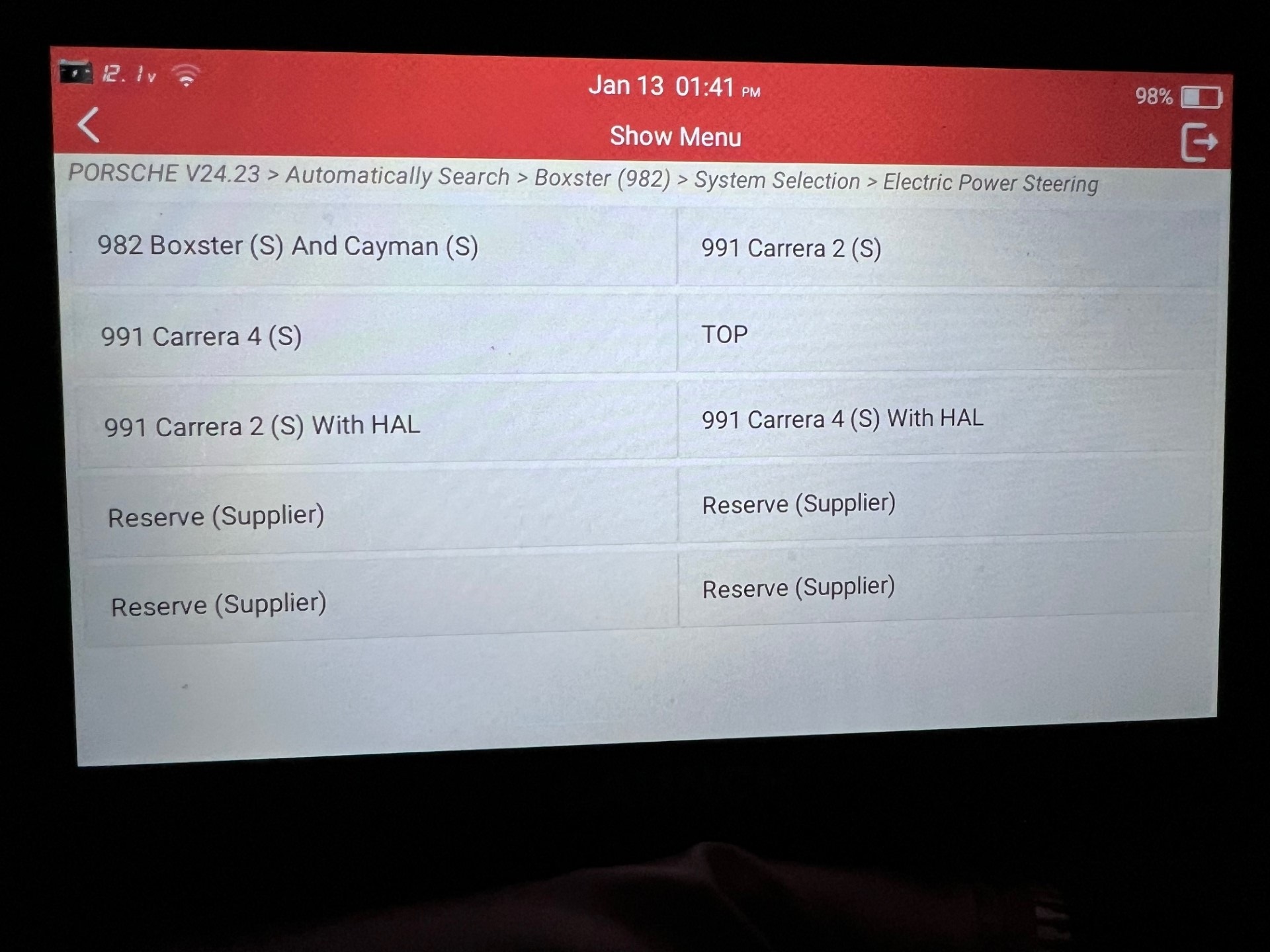
- Power Steering Coding.jpg (456.7 KiB) Viewed 1739 times
Re: 718 Coding using Launch X431 tool
Posted: Sun Feb 18, 2024 2:43 pm
by sleon67
which model x431 are you using?
I've got a 2024 Cayman base ordered and auto start/stop is my first target.
Thanks.