Page 19 of 20
Re: 718 Coding using Launch X431 tool
Posted: Fri Jan 24, 2025 12:19 pm
by grasmere
I’ve ordered a pair of door puddle lights to fit shortly and though I’ve ‘searched’ but haven’t come across a mention of coding the activation of door puddle lights with X431,
or I’m wondering if they can only be ‘activated’ with PIWIS if anyone knows please?
Note:
Found out the answer and it is yes, though I’ve yet to install and do the coding but the coding is as in this pic:
This is drivers door, then also do passenger door, I’ll add pics once iveb8nstalled and working
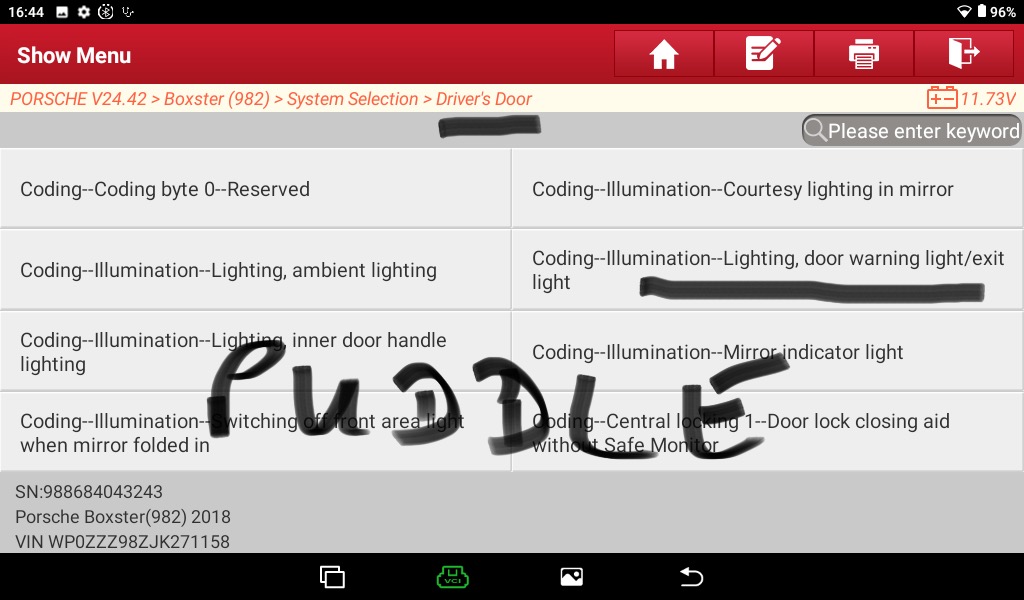
- IMG_1368.jpeg (120.99 KiB) Viewed 4477 times
Re: 718 Coding using Launch X431 tool
Posted: Sun Jan 26, 2025 8:22 am
by grasmere
Brilliant info all round here - thanks to all involved

So I’ve got my 919 on wifi, fully updated all round and first time use, and did an auto search for car searching for VIN which it found etc
But my 2018 Cayman S 982 comes up as a 2018 Boxter S 982 !
If I do the other manual search there is a Cayman listed but just 2 older years!
Apart from listing boxter stuff like the roof, does it matter and any thoughts as to how can I get to recognise the car as a 2018 Cayman S
Thanks
Re: 718 Coding using Launch X431 tool
Posted: Tue Jan 28, 2025 5:54 am
by ReidMcT
grasmere wrote: Sun Jan 26, 2025 8:22 am
Apart from listing boxter stuff like the roof, does it matter and any thoughts as to how can I get to recognise the car as a 2018 Cayman S
It does not matter. Boxster is the only choice, but it includes all the Cayman stuff.
Re: 718 Coding using Launch X431 tool
Posted: Tue Apr 29, 2025 8:47 am
by Lynx man
Good afternoon All,
I am trying to code a 981 from a Boxster to a Cayman as I believe this option M148 increases power by 10bhp.
I know its possible on Piwiss but is it possible with Thinkdiag?
Having looked through the many menus I cannot find the right section.
Any help most welcome.
Re: 718 Coding using Launch X431 tool
Posted: Wed Apr 30, 2025 8:47 am
by J-Dub
Do you have any reference for this, maybe that will help get me to better understand what is involved.
In the 718 you can change the instrument cluster to any model you want, for example a base boxter can be changed to a GT4RS but again, that will only change the instrument cluster/graphics/menu selection etc.
The engine calibration is in the DME and cannot typically be altered by this type of product, you would need a tool specifically designed for that. I have used a myGenious for example to change the engine calibration.
Looking forward to any other details you can provide and welcome to the forums!
Jeremy
Lynx man wrote: Tue Apr 29, 2025 8:47 am
I am trying to code a 981 from a Boxster to a Cayman as I believe this option M148 increases power by 10bhp.
I know its possible on Piwiss but is it possible with Thinkdiag?
Having looked through the many menus I cannot find the right section.
Re: 718 Coding using Launch X431 tool
Posted: Wed Apr 30, 2025 4:02 pm
by Scott Evil
J-Dub wrote: Wed Apr 30, 2025 8:47 am
Do you have any reference for this, maybe that will help get me to better understand what is involved.
In the 718 you can change the instrument cluster to any model you want, for example a base boxter can be changed to a GT4RS but again, that will only change the instrument cluster/graphics/menu selection etc.
The engine calibration is in the DME and cannot typically be altered by this type of product, you would need a tool specifically designed for that. I have used a myGenious for example to change the engine calibration.
Looking forward to any other details you can provide and welcome to the forums!
Jeremy
Lynx man wrote: Tue Apr 29, 2025 8:47 am
I am trying to code a 981 from a Boxster to a Cayman as I believe this option M148 increases power by 10bhp.
I know its possible on Piwiss but is it possible with Thinkdiag?
Having looked through the many menus I cannot find the right section.
There is a 87 page thread in the 991 forum on Rennlist. There is some Q&A on this topic and it is easy to change the start-up image on the MFD screen, it does not change the engine output. I have not seen, and there does not appear to be any DME settings that would change the motor calibration using ThinkDiag. Probably need a Cobb to do that.
There is a ton of other things that can be adjusted.
Re: 718 Coding using Launch X431 tool
Posted: Fri May 02, 2025 1:02 am
by Lynx man
Thanks for your replies and the welcome to the forum. I have been given instructions on changing it using Piwiss but cant find the menu in the Thinkdiag. Have made lots of other changes using the system dash calibration ect and they all work fine.
it might be i need to got the Piwiss route as 10 bhp is 10 bhp right !!
Kind regards
Re: 718 Coding using Launch X431 tool
Posted: Fri May 02, 2025 8:24 am
by Scott Evil
Lynx man wrote: Fri May 02, 2025 1:02 am
Thanks for your replies and the welcome to the forum. I have been given instructions on changing it using Piwiss but cant find the menu in the Thinkdiag. Have made lots of other changes using the system dash calibration ect and they all work fine.
it might be i need to got the Piwiss route as 10 bhp is 10 bhp right !!
Kind regards
https://www.renntech.org/topic/55779-pi ... nslations/
Try this link to a spreadsheet which translates most of the German menu items to English. It may help you search for the menu you are looking for.
Re: 718 Coding using Launch X431 tool
Posted: Fri May 02, 2025 8:58 am
by Arne2
Lynx man wrote: Fri May 02, 2025 1:02 am
Thanks for your replies and the welcome to the forum. I have been given instructions on changing it using Piwiss but cant find the menu in the Thinkdiag.
Please post the instructions here, or send them to me in a PM and I'll take a look to see if I can find it in my Launch tool. If I can find the path there, it almost always relates to the ThinkDiag path.
Re: 718 Coding using Launch X431 tool
Posted: Fri May 02, 2025 9:58 am
by Ken G
Arne2 wrote: Fri May 02, 2025 8:58 am
Lynx man wrote: Fri May 02, 2025 1:02 am
Thanks for your replies and the welcome to the forum. I have been given instructions on changing it using Piwiss but cant find the menu in the Thinkdiag.
Please post the instructions here, or send them to me in a PM and I'll take a look to see if I can find it in my Launch tool. If I can find the path there, it almost always relates to the ThinkDiag path.
The thinkdiag codes should be identical (or at least very similar) to the codes on your launch. I am pretty sure they are made by the same company since everything is so similar.
I have seen the option code on the PIWIS to add the 10 extra horsepower. I don't know if this works on the 718 and didn't have the guts to try enabling it with auto coding using the PIWIS. I also haven't seen anything on enabling this with manual coding. However, if it is just involves changing the value of some codes, I would be interested in how to do it.
